Blog: Product

New features |
Plugins
By: Chris Chandler
27 February 2026
The new Omnata MS Excel Plugin connects Microsoft 365 Excel sheets hosted in SharePoint directly to Snowflake, with automated bi-directional syncs running inside your Snowflake account. No complex configuration, no external SaaS tools handling your data, just a Native App installed from the Marketplace.
Three ways to use it
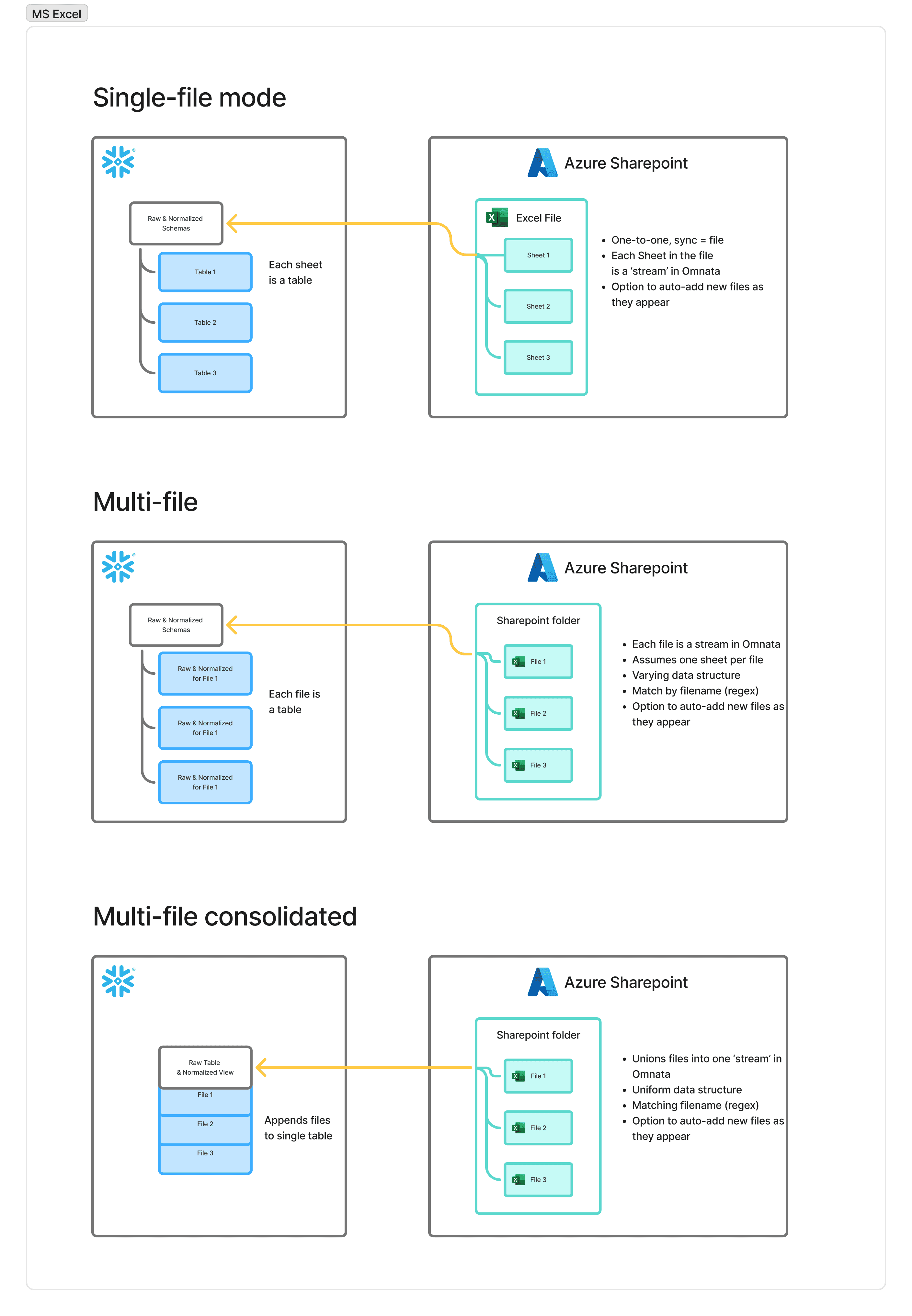
Sync a single spreadsheet. Point the plugin at a specific Excel sheet in SharePoint, map it to a Snowflake table or view, and set a schedule. Push Snowflake data out to the sheet, ingest from it back into Snowflake, or both. Useful for reports your finance or ops team maintain in Excel, or any sheet that needs to stay in sync with your warehouse.
Sync a folder of spreadsheets.
There are two multi-file sub modes; point at a folder and each file is landed as a table, or append uniform files to one table.
The first is useful if you have a folder or mismatched files. The second, is if you receive regular data dumps of uniform Excel files from a third party, or an internal team. Point the plugin at a SharePoint folder, enable 'auto-add new objects' and it will ingest every file it finds there automatically.
No manual uploads, no one-by-one configuration.
Omnata Sync is the simplest native option
Because Omnata runs as a true Native App inside your Snowflake account, your data never leaves your environment and there's nothing to provision or maintain outside of it. Your data is safe for cyber and data privacy requirements, plus you can sync as much data as you want for the same flat fee.
Get started
Install the Omnata Sync Engine (free listing) and Excel Plugin for a 30-day free trial.
All Omnata connectors charge a flat fee for unlimited records, and you can pay using Snowflake Credits (if in an eligible region).