Share post
Share post
Blog: Product
UPDATE: Multi-file syncs for Google Sheets (free)
UPDATE: Multi-file syncs for Google Sheets (free)
Snowflake |
Analytics
By: Chris Chandler
16 July 2026
The Omnata Google Sheets Plugin now syncs entire folders
The Omnata Google Sheets Plugin has always supported bi-directional sync between individual Google Sheets and Snowflake. It now supports syncing multiple sheets from a Google Drive folder at once, using a filename pattern to control which files are included — the same multi-file capability already available in the Omnata MS Excel Plugin.
Three ways to bring Google Sheets data into Snowflake
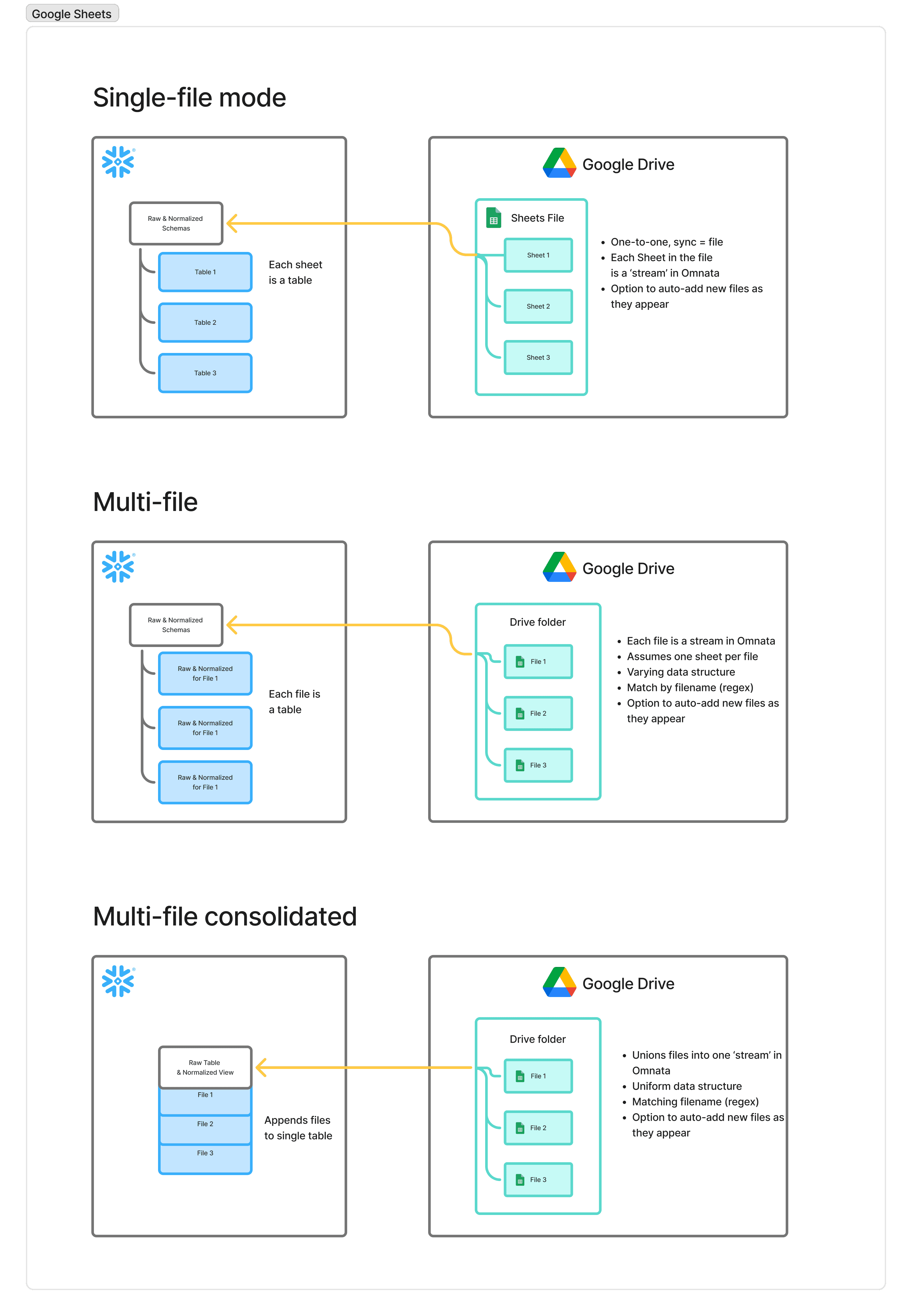
The inbound sync has three modes depending on how your files are organised.
Single file points the plugin at one Google Sheet. Each tab in the spreadsheet becomes its own stream, and you can enable auto-detection of new tabs so they're added automatically on subsequent runs. This is the right mode for a single report or dataset your team maintains in Sheets.
Multi-file points the plugin at a Google Drive folder with a filename pattern (for example, ^daily_.*). Each matching file becomes its own stream, on the assumption of one tab per file. New files matching the pattern are picked up automatically. This works well when each file represents a distinct dataset — one file per region, one per customer, or one per data provider.
Multi-file consolidate uses the same folder-and-pattern approach, but appends all matching files into a single stream rather than keeping them separate. This is the right choice when files share a common schema and you want them stitched together into one table: one file per month, one per sales territory, one per batch export. The configuration form previews matched files before you save, so you can sanity-check the pattern first.
Single file syncs use full refresh. Multi-file modes also support incremental sync — files in Google Drive that haven't changed since the last run are skipped automatically.
Push Snowflake data back to Google Sheets
The outbound sync copies a Snowflake table or view into a specific tab in a Drive-hosted spreadsheet. The Replace strategy clears the tab's existing contents and writes the full Snowflake dataset, so the sheet always reflects the current state of your query.
This is useful for reports, dashboards, or operational sheets that need to stay in sync with your warehouse without anyone manually exporting data.
The Google Sheets Plugin is free, and runs on your existing warehouse
The plugin is free on the Snowflake Marketplace. The only cost is the Snowflake warehouse compute used when a sync runs. Syncs run inside your existing Snowflake account and can share a warehouse (XS recommended) with other workloads, so there's no need to provision anything separately.
Because Omnata runs as a true Native App inside your Snowflake account, your data is safe for cyber security and data privacy requirements.
Get started now
Available free on the Snowflake Marketplace. Requires Omnata Sync (free core listing) and files hosted in Google Drive.
Documentation · Marketplace listing
The Omnata Google Sheets Plugin now syncs entire folders
The Omnata Google Sheets Plugin has always supported bi-directional sync between individual Google Sheets and Snowflake. It now supports syncing multiple sheets from a Google Drive folder at once, using a filename pattern to control which files are included — the same multi-file capability already available in the Omnata MS Excel Plugin.
Three ways to bring Google Sheets data into Snowflake
The inbound sync has three modes depending on how your files are organised.
Single file points the plugin at one Google Sheet. Each tab in the spreadsheet becomes its own stream, and you can enable auto-detection of new tabs so they're added automatically on subsequent runs. This is the right mode for a single report or dataset your team maintains in Sheets.
Multi-file points the plugin at a Google Drive folder with a filename pattern (for example, ^daily_.*). Each matching file becomes its own stream, on the assumption of one tab per file. New files matching the pattern are picked up automatically. This works well when each file represents a distinct dataset — one file per region, one per customer, or one per data provider.
Multi-file consolidate uses the same folder-and-pattern approach, but appends all matching files into a single stream rather than keeping them separate. This is the right choice when files share a common schema and you want them stitched together into one table: one file per month, one per sales territory, one per batch export. The configuration form previews matched files before you save, so you can sanity-check the pattern first.
Single file syncs use full refresh. Multi-file modes also support incremental sync — files in Google Drive that haven't changed since the last run are skipped automatically.
Push Snowflake data back to Google Sheets
The outbound sync copies a Snowflake table or view into a specific tab in a Drive-hosted spreadsheet. The Replace strategy clears the tab's existing contents and writes the full Snowflake dataset, so the sheet always reflects the current state of your query.
This is useful for reports, dashboards, or operational sheets that need to stay in sync with your warehouse without anyone manually exporting data.
The Google Sheets Plugin is free, and runs on your existing warehouse
The plugin is free on the Snowflake Marketplace. The only cost is the Snowflake warehouse compute used when a sync runs. Syncs run inside your existing Snowflake account and can share a warehouse (XS recommended) with other workloads, so there's no need to provision anything separately.
Because Omnata runs as a true Native App inside your Snowflake account, your data is safe for cyber security and data privacy requirements.
Get started now
Available free on the Snowflake Marketplace. Requires Omnata Sync (free core listing) and files hosted in Google Drive.
Documentation · Marketplace listing
subscribe
Deliver the goods to your inbox
subscribe