Share post
Share post
Blog: Product
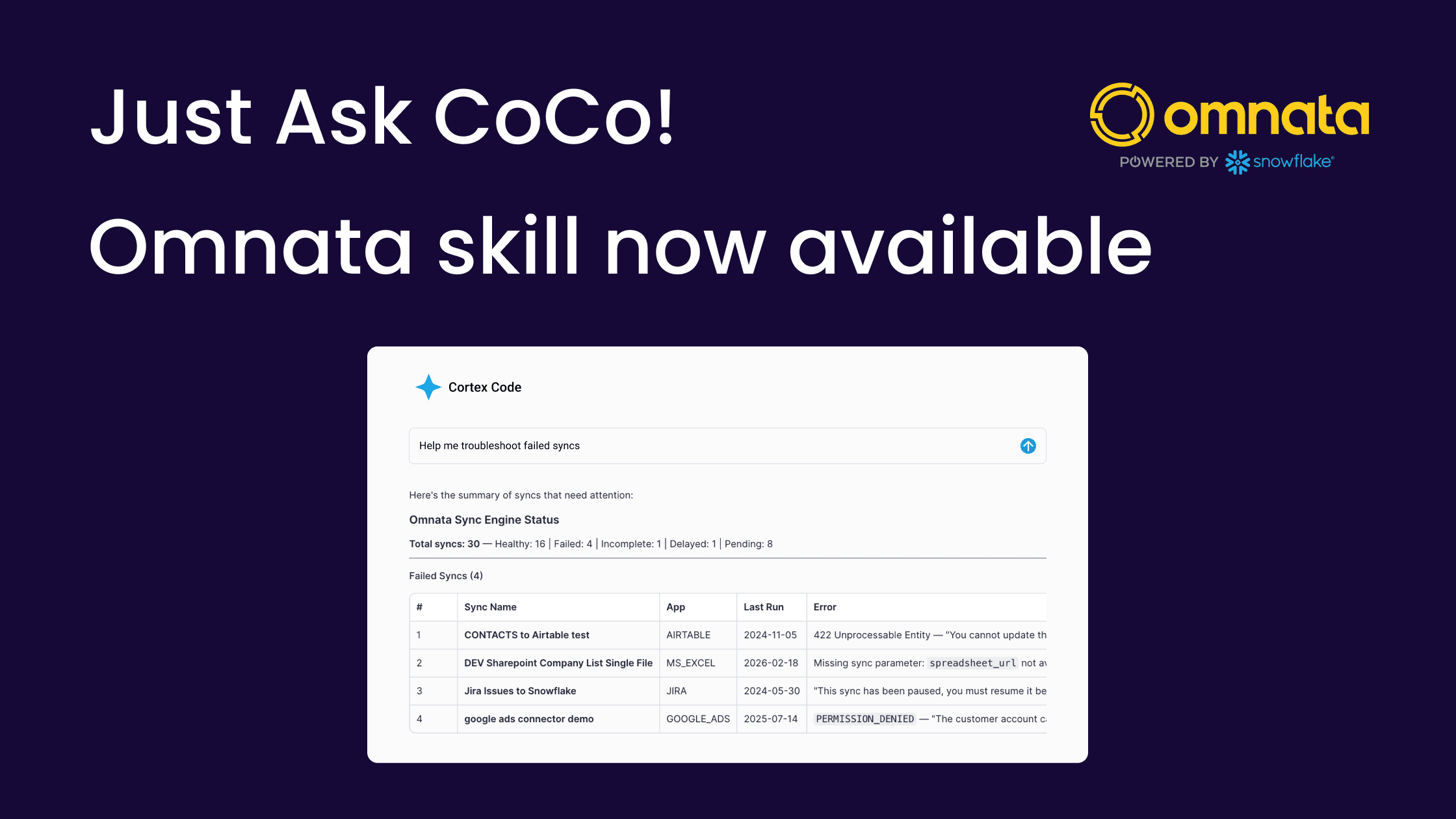
Got problems with a sync? Just ask CoCo!
Got problems with a sync? Just ask CoCo!
New features |
Cortex Code
By: Chris Chandler
24 April 2026
Diagnosing sync failures is a big time saver
We've built a Cortex Code skill that turns Snowflake's built-in AI assistant into an expert on your Omnata Sync native app. You can monitor syncs, analyse your warehouse costs and get it to perform some actions, however, the biggest value unlock is in troubleshooting.
When a sync fails, it walks you from first symptom to root cause to resolution — or to a fully assembled support ticket if escalation is needed. There's no need to know which internal views to query, how to parse JSON state columns, or how to read Snowflake event table stack traces.
It's free and self-installs in minutes.
What is CoCo (Cortex Code)?
On the off chance you hadn't heard…
Snowflake Cortex is Snowflake's suite of built-in AI capabilities — including LLM functions, Cortex Analyst for natural language queries, and Cortex Search for semantic retrieval over your data. Cortex Code skills are a newer capability: structured knowledge files that teach Cortex about a specific domain, so the AI assistant can write and execute relevant SQL rather than giving generic answers. And we've trained it to use Omnata.
Because Omnata is a Native App running inside your Snowflake account, the two fit together without friction. Cortex can directly query Omnata's internal tables, access its extensive stored procedure interface and investigate the Snowflake event table for error logs.
You can use the Omnata skill in both Cortex Code in Snowsite, and the Cortex CLI.
Save hours when issues arise
Syncs can break for a multitude of reasons. Today, finding out why requires knowing which internal views to query, how to cross-reference run history with record-level errors, and how to read Snowflake event table stack traces.
Not to mention, all of the niche knowledge of the target application, error codes and known issues. A data engineer typically has to consult with the remote system admin, or reach out to Omnata for help. If you do need to escalate to support, the first two to three correspondences involve tracing the error or performing further diagnosis steps
The Omnata Sync Administration Skill encodes all of this expertise and makes it available to any Snowflake user.
Advanced troubleshooting flow with support hand-off
The skill's primary value is guided diagnosis: taking a sync failure from first symptom all the way to resolution or a complete support handoff, without the user needing to know where to look at each step, or have any expertise in Omnata's application architecture.
The Omnata Skill will follow the escalation path to troubleshoot sync issues:
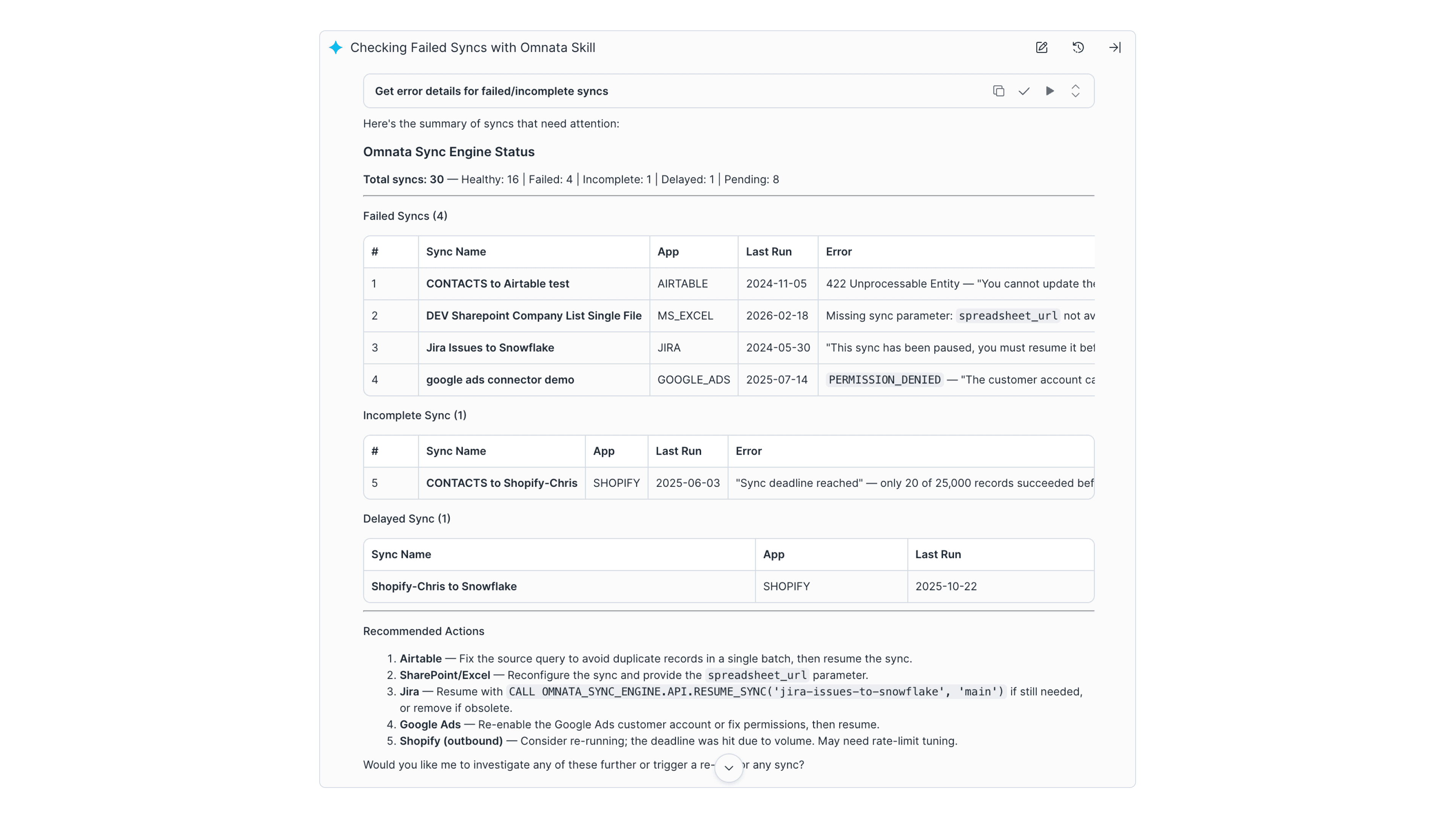
Investigate status and error messages at the application level
Classify the error and advise the user with general knowledge of endpoints
Analyse the Snowflake event table for Omnata error logs
Draft a support ticket for hand-off to Omnata
Step 1: Investigate the failure
Cortex checks overall sync health, identifies which syncs are failing and why, and examines run history to spot patterns. It determines whether the problem is at the sync level, the record level, or a specific inbound data stream. It distinguishes between a one-off failure that's safe to retry and a persistent pattern that needs investigation.
Step 2: Classify the error and apply endpoint knowledge
Rather than surfacing a raw error code, Cortex classifies where the error originated, whether it's a Snowflake-side mapping issue, the destination app rejecting records, or a platform-level connectivity problem. It then combines that classification with its knowledge of the specific endpoint (Salesforce, HubSpot, Airtable, and others) to explain what the error actually means and what to do about it in Omnata's UI or via SQL.
Step 3: Go deeper with Snowflake event logs
When the error surfaced in the data views isn't enough to explain the failure, Cortex escalates to Snowflake's event table; pulling full Python stack traces, the sync run lifecycle timeline, and recurring error patterns across runs. This level of diagnosis previously required a developer with knowledge of both Omnata's internals and Snowflake's observability schema.
Step 4: Hand off to support if needed
If the issue can't be resolved self-service, Cortex checks the Omnata and Snowflake status pages for active incidents, then assembles a complete support ticket; all relevant sync IDs, error text, stack traces, and region information, formatted and ready to send to support@omnata.com. The full diagnostic chain is preserved so support has everything they need from the first message.
Beyond troubleshooting
The skill also handles connection health and credential history, warehouse credit attribution per sync with dollar estimates, and advanced connection management. Covering the operational tasks that sit alongside active incident response.
How it works
The skill is a set of markdown knowledge files hosted on GitHub. They teach Cortex about Omnata's internal table structure (OMNATA_SYNC_ENGINE.DATA_VIEWS), the stored procedure API, sync and record state models, error classification logic, and the Snowflake event table schema that Omnata logs to. Cortex reads these files, writes the appropriate SQL, and executes it against your Snowflake account. Nothing passes through Omnata's servers. The skill is read-only — it queries and interprets, it doesn't modify your data or configuration.
This is the only Cortex Code skill purpose-built for a Snowflake Native App. The architecture matters: because both the skill and Omnata Sync run inside the same account boundary, Cortex has direct access to the views and event logs it needs without any external hop.
See it in action
Get started
The skill is free and open source, with self-install instructions in the README file.
Install via a single git clone using the Cortex CLI, or paste the setup prompt into a Snowsight workspace. Updates pull with git pull.
gitGitHub — omnata-sync-administration-skill · Omnata Sync on the Marketplace · Documentation
Diagnosing sync failures is a big time saver
We've built a Cortex Code skill that turns Snowflake's built-in AI assistant into an expert on your Omnata Sync native app. You can monitor syncs, analyse your warehouse costs and get it to perform some actions, however, the biggest value unlock is in troubleshooting.
When a sync fails, it walks you from first symptom to root cause to resolution — or to a fully assembled support ticket if escalation is needed. There's no need to know which internal views to query, how to parse JSON state columns, or how to read Snowflake event table stack traces.
It's free and self-installs in minutes.
What is CoCo (Cortex Code)?
On the off chance you hadn't heard…
Snowflake Cortex is Snowflake's suite of built-in AI capabilities — including LLM functions, Cortex Analyst for natural language queries, and Cortex Search for semantic retrieval over your data. Cortex Code skills are a newer capability: structured knowledge files that teach Cortex about a specific domain, so the AI assistant can write and execute relevant SQL rather than giving generic answers. And we've trained it to use Omnata.
Because Omnata is a Native App running inside your Snowflake account, the two fit together without friction. Cortex can directly query Omnata's internal tables, access its extensive stored procedure interface and investigate the Snowflake event table for error logs.
You can use the Omnata skill in both Cortex Code in Snowsite, and the Cortex CLI.
Save hours when issues arise
Syncs can break for a multitude of reasons. Today, finding out why requires knowing which internal views to query, how to cross-reference run history with record-level errors, and how to read Snowflake event table stack traces.
Not to mention, all of the niche knowledge of the target application, error codes and known issues. A data engineer typically has to consult with the remote system admin, or reach out to Omnata for help. If you do need to escalate to support, the first two to three correspondences involve tracing the error or performing further diagnosis steps
The Omnata Sync Administration Skill encodes all of this expertise and makes it available to any Snowflake user.
Advanced troubleshooting flow with support hand-off
The skill's primary value is guided diagnosis: taking a sync failure from first symptom all the way to resolution or a complete support handoff, without the user needing to know where to look at each step, or have any expertise in Omnata's application architecture.
The Omnata Skill will follow the escalation path to troubleshoot sync issues:
Investigate status and error messages at the application level
Classify the error and advise the user with general knowledge of endpoints
Analyse the Snowflake event table for Omnata error logs
Draft a support ticket for hand-off to Omnata
Step 1: Investigate the failure
Cortex checks overall sync health, identifies which syncs are failing and why, and examines run history to spot patterns. It determines whether the problem is at the sync level, the record level, or a specific inbound data stream. It distinguishes between a one-off failure that's safe to retry and a persistent pattern that needs investigation.
Step 2: Classify the error and apply endpoint knowledge
Rather than surfacing a raw error code, Cortex classifies where the error originated, whether it's a Snowflake-side mapping issue, the destination app rejecting records, or a platform-level connectivity problem. It then combines that classification with its knowledge of the specific endpoint (Salesforce, HubSpot, Airtable, and others) to explain what the error actually means and what to do about it in Omnata's UI or via SQL.
Step 3: Go deeper with Snowflake event logs
When the error surfaced in the data views isn't enough to explain the failure, Cortex escalates to Snowflake's event table; pulling full Python stack traces, the sync run lifecycle timeline, and recurring error patterns across runs. This level of diagnosis previously required a developer with knowledge of both Omnata's internals and Snowflake's observability schema.
Step 4: Hand off to support if needed
If the issue can't be resolved self-service, Cortex checks the Omnata and Snowflake status pages for active incidents, then assembles a complete support ticket; all relevant sync IDs, error text, stack traces, and region information, formatted and ready to send to support@omnata.com. The full diagnostic chain is preserved so support has everything they need from the first message.
Beyond troubleshooting
The skill also handles connection health and credential history, warehouse credit attribution per sync with dollar estimates, and advanced connection management. Covering the operational tasks that sit alongside active incident response.
How it works
The skill is a set of markdown knowledge files hosted on GitHub. They teach Cortex about Omnata's internal table structure (OMNATA_SYNC_ENGINE.DATA_VIEWS), the stored procedure API, sync and record state models, error classification logic, and the Snowflake event table schema that Omnata logs to. Cortex reads these files, writes the appropriate SQL, and executes it against your Snowflake account. Nothing passes through Omnata's servers. The skill is read-only — it queries and interprets, it doesn't modify your data or configuration.
This is the only Cortex Code skill purpose-built for a Snowflake Native App. The architecture matters: because both the skill and Omnata Sync run inside the same account boundary, Cortex has direct access to the views and event logs it needs without any external hop.
See it in action
Get started
The skill is free and open source, with self-install instructions in the README file.
Install via a single git clone using the Cortex CLI, or paste the setup prompt into a Snowsight workspace. Updates pull with git pull.
gitGitHub — omnata-sync-administration-skill · Omnata Sync on the Marketplace · Documentation
Diagnosing sync failures is a big time saver
We've built a Cortex Code skill that turns Snowflake's built-in AI assistant into an expert on your Omnata Sync native app. You can monitor syncs, analyse your warehouse costs and get it to perform some actions, however, the biggest value unlock is in troubleshooting.
When a sync fails, it walks you from first symptom to root cause to resolution — or to a fully assembled support ticket if escalation is needed. There's no need to know which internal views to query, how to parse JSON state columns, or how to read Snowflake event table stack traces.
It's free and self-installs in minutes.
What is CoCo (Cortex Code)?
On the off chance you hadn't heard…
Snowflake Cortex is Snowflake's suite of built-in AI capabilities — including LLM functions, Cortex Analyst for natural language queries, and Cortex Search for semantic retrieval over your data. Cortex Code skills are a newer capability: structured knowledge files that teach Cortex about a specific domain, so the AI assistant can write and execute relevant SQL rather than giving generic answers. And we've trained it to use Omnata.
Because Omnata is a Native App running inside your Snowflake account, the two fit together without friction. Cortex can directly query Omnata's internal tables, access its extensive stored procedure interface and investigate the Snowflake event table for error logs.
You can use the Omnata skill in both Cortex Code in Snowsite, and the Cortex CLI.
Save hours when issues arise
Syncs can break for a multitude of reasons. Today, finding out why requires knowing which internal views to query, how to cross-reference run history with record-level errors, and how to read Snowflake event table stack traces.
Not to mention, all of the niche knowledge of the target application, error codes and known issues. A data engineer typically has to consult with the remote system admin, or reach out to Omnata for help. If you do need to escalate to support, the first two to three correspondences involve tracing the error or performing further diagnosis steps
The Omnata Sync Administration Skill encodes all of this expertise and makes it available to any Snowflake user.
Advanced troubleshooting flow with support hand-off
The skill's primary value is guided diagnosis: taking a sync failure from first symptom all the way to resolution or a complete support handoff, without the user needing to know where to look at each step, or have any expertise in Omnata's application architecture.
The Omnata Skill will follow the escalation path to troubleshoot sync issues:
Investigate status and error messages at the application level
Classify the error and advise the user with general knowledge of endpoints
Analyse the Snowflake event table for Omnata error logs
Draft a support ticket for hand-off to Omnata
Step 1: Investigate the failure
Cortex checks overall sync health, identifies which syncs are failing and why, and examines run history to spot patterns. It determines whether the problem is at the sync level, the record level, or a specific inbound data stream. It distinguishes between a one-off failure that's safe to retry and a persistent pattern that needs investigation.
Step 2: Classify the error and apply endpoint knowledge
Rather than surfacing a raw error code, Cortex classifies where the error originated, whether it's a Snowflake-side mapping issue, the destination app rejecting records, or a platform-level connectivity problem. It then combines that classification with its knowledge of the specific endpoint (Salesforce, HubSpot, Airtable, and others) to explain what the error actually means and what to do about it in Omnata's UI or via SQL.
Step 3: Go deeper with Snowflake event logs
When the error surfaced in the data views isn't enough to explain the failure, Cortex escalates to Snowflake's event table; pulling full Python stack traces, the sync run lifecycle timeline, and recurring error patterns across runs. This level of diagnosis previously required a developer with knowledge of both Omnata's internals and Snowflake's observability schema.
Step 4: Hand off to support if needed
If the issue can't be resolved self-service, Cortex checks the Omnata and Snowflake status pages for active incidents, then assembles a complete support ticket; all relevant sync IDs, error text, stack traces, and region information, formatted and ready to send to support@omnata.com. The full diagnostic chain is preserved so support has everything they need from the first message.
Beyond troubleshooting
The skill also handles connection health and credential history, warehouse credit attribution per sync with dollar estimates, and advanced connection management. Covering the operational tasks that sit alongside active incident response.
How it works
The skill is a set of markdown knowledge files hosted on GitHub. They teach Cortex about Omnata's internal table structure (OMNATA_SYNC_ENGINE.DATA_VIEWS), the stored procedure API, sync and record state models, error classification logic, and the Snowflake event table schema that Omnata logs to. Cortex reads these files, writes the appropriate SQL, and executes it against your Snowflake account. Nothing passes through Omnata's servers. The skill is read-only — it queries and interprets, it doesn't modify your data or configuration.
This is the only Cortex Code skill purpose-built for a Snowflake Native App. The architecture matters: because both the skill and Omnata Sync run inside the same account boundary, Cortex has direct access to the views and event logs it needs without any external hop.
See it in action
Get started
The skill is free and open source, with self-install instructions in the README file.
Install via a single git clone using the Cortex CLI, or paste the setup prompt into a Snowsight workspace. Updates pull with git pull.
gitGitHub — omnata-sync-administration-skill · Omnata Sync on the Marketplace · Documentation
subscribe
Deliver the goods to your inbox
subscribe